How to create a dynamic Trainer Battle Script
Dynamic Trainer Battle Scripting enables more fine-grained control over pre-battle scripts while reducing the implementation effort for different trainerbattle macros.
Previously, different behavior of pre-battle scripts were statically defined by modes such as TRAINER_BATTLE_SINGLE or TRAINER_BATTLE_DOUBLE. Each small variation of these modes required its own dedicated mode, leading to a quick explosion in possible states. Additionally, the static system encouraged duplicate script fragments for various modes.
Dynamic Trainer Battle Scripting removes modes entirely and instead constructs a pre-battle script depending on which parameters have been initialized.
This behavior depends on three PRs:
- Trainer Battle Parameter Consolidation
- Trainer Battle Type Differentiation
- Dynamic Trainer Battle Scripting
There may be follow up PRs but their functionality is not covered here.
Terminology
- trainerbattle scripts are those invoked by the
trainerbattleorfacilitybattlemacros, as well as parameterized versions such astrainerbattle_single. These scripts define the events when the player either talks to or is spotted by an undefeated trainer up to the point the battle intro transition starts, as well as any events immediately following the return to the overworld after the battle ends.- e.g.
EventScript_TryDoNormalTrainerBattleand those that follow
- e.g.
- trainerbattle modes (previously) defined different battle types that could be handled, like single, double and rematch battles. Additionally, they controlled small variations of these standard types. For example, to omit the intro text or to continue to a specified script after the battle ends.
- Different modes can be seen in
include/constants/battle_setup.h, but note that this file has been removed in #8678
- Different modes can be seen in
- event scripts are the discrete scripts which make up a trainerbattle script. Usually prefixed by
EventScript - event snippets define small event scripts that usually define a single event, like showing the intro message. They are the building blocks from which the battle scripts are compiled. A snippet should contain any instruction necessary for an event, but no more than necessary. However, small is not a strict qualifier here, so a snippet may contain any number of statements. There are some (loose) rules when working with snippets:
- A snippet must end with a
returnstatement if other snippets should be able to execute after it. - A snippet can end with and
endstatement but will always end script execution if executed. - Similarly to event scripts, snippets should be prefixed with
EventSnippet - event snippets are a convention, not a defined structure. Any script may theoretically be used with the script builder
- A snippet must end with a
- trainerbattle parameter hold the data for a specific trainer battle in memory such as trainer id or intro text. They are set by the
trainerbattlemacro and correspond to theTrainerBattleParameterstruct ininclude/battle_setup.h. Typically, on activating a trainer battle the data is copied to the globalgTrainerBattleParameterstruct, which should be accessed using theTRAINER_BATTLE_PARAMmacro.- For more information on this check out Trainer Battle Parameter Consolidation
- script context is the environment in which a script is executed. It holds the script which will be executed by the script engine. Also has a stack for scripts.
- stack is a last in, first out data type. Basic understanding of stacks is recommended but not strictly required.
Concept
Previously, trainerbattle scripts were relatively static. On mode selection, the appropriate event script was loaded and executed on the global script context. With Dynamic Trainer Battle Scripts the final script is instead assembled from event snippets. On talking to or being spotted by a trainer, the game performs various checks and pushes appropriate event snippets to the global script stack. By default, these checks often determine if a member of the global trainerbattle parameter struct is NOT NULL and push the related event snippet if it is not null. Once the stack is filled with snippets, the first snippet is popped from the top of the stack and executed. returns at the end of a snippet will pop the next snippet from the stack until the stack is empty or an end is encounterd.
Let’s go over a simple example to illustrate this. Consider the following trainer battle:
trainerbattle_single TRAINER_TIANA, Route102_Text_TianaIntro, Route102_Text_TianaDefeated
Here, the trainer battle holds a pointer to the intro text which is shown before the battle starts.
This pointer is copied over to the introTextA member of gTrainerBattleParameter.
Later, the script snippet EventSnippet_ShowTrainerIntroMsg is pushed to the global script stack only if the pointer was set.
if (battleParams->params.introTextA)
    ScriptStackPush(scrStack, EventSnippet_ShowTrainerIntroMsg);
But what if we don’t want the intro message to show?
Previously, the mode TRAINER_BATTLE_SINGLE_NO_INTRO_TEXT had to be used.
With Dynamic Trainer Battle Scripts, simply changing the pointer to NULL will achieve the same result:
trainerbattle_single TRAINER_TIANA, NULL, Route102_Text_TianaDefeated
introTextA = Route102_Text_TianaIntro | introTextA = NULL |
|---|---|
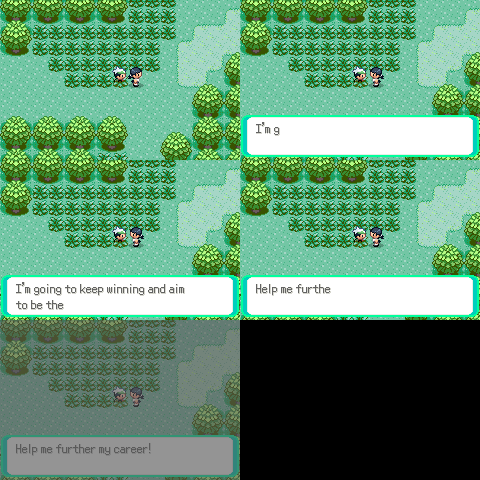 | 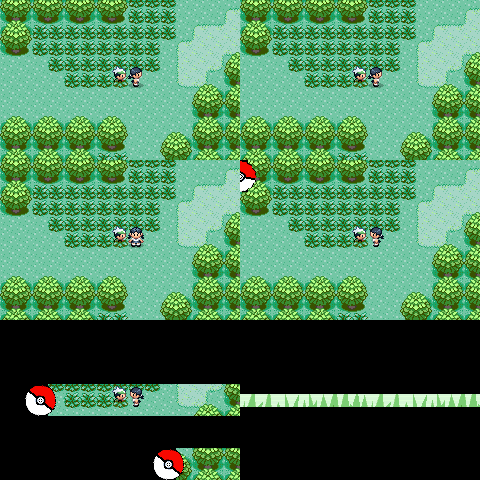 |
To understand how this works lets examine how the script stack is build.
When talking to the trainer, the trainerbattle macro will eventually invoke the function BattleSetup_ConfigureTrainerBattle, which is responsible for populating the script stack.
static void BattleSetup_ConfigureTrainerBattle(TrainerBattleParameter *battleParams, struct ScriptStack *scrStack)
{
    PUSH       (EventSnippet_Lock)
    PUSH_IF_SET(EventSnippet_FacePlayer, battleParams->params.facePlayer)
    PUSH       (EventSnippet_RevealTrainer)
    PUSH_IF_SET(EventSnippet_PlayTrainerEncounterMusic, battleParams->params.playMusicA)
    PUSH       (EventSnippet_SetTrainerFacingDirection);
!   PUSH_IF_SET(EventSnippet_ShowTrainerIntroMsg, battleParams->params.introTextA)
    PUSH_IF_ELSE(EventSnippet_DoRematchTrainerBattle, EventSnippet_DoTrainerBattle, battleParams->params.isRematch)
    PUSH_IF_ELSE(EventSnippet_GotoPostBattleScript, EventSnippet_EndTrainerBattle, battleParams->params.continueScript)

    return;
}
Note
The function was simplified here for this demonstration.
The PUSH macro (and variants) pushes the event snippet to the script stack passed to the function. Some snippets should always happen such as EventSnippet_Lock, others only if a condition is met. Consider the highlighted line. The snippet responsible for displaying the intro text is only pushed to the stack if the introTextA parameter is not null. The table below shows the finished stack.
introTextA = Route102_Text_TianaIntro | introTextA = NULL |
|---|---|
| Stack Top | |
| EventSnippet_EndTrainerBattle | EventSnippet_EndTrainerBattle |
| EventSnippet_DoTrainerBattle | EventSnippet_DoTrainerBattle |
| EventSnippet_ShowTrainerIntroMsg | EventSnippet_SetTrainerFacingDirection |
| EventSnippet_SetTrainerFacingDirection | … |
| … | … |
| Stack Bottom |
Please note, that at this point the snippets sit on the stack in reversed order (the last snippet at the top and vice versa).
Here, the snippets are first pushed to a temporary stack and then later popped and pushed to the global script stack, reversing their order (see: ConfigureTrainerBattle).
This allows us to write the snippets in sequential order from first to last.
Customizing a battle
To illustrate how use Dynamic Trainer Battle Scripts to customize your own battles let’s walk through an example. The goal is to automatically heal the party whenever a trainer spots the player. The GIF below shows the final result.
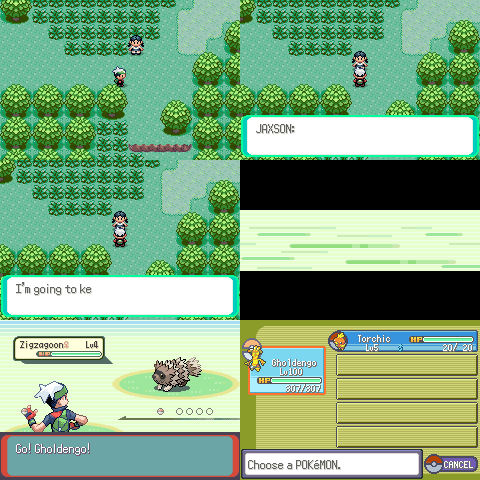
1. Define the event snippet
in data/scripts/trainer_battle.inc:
EventSnippet_HealParty::
	msgbox Text_HealParty, MSGBOX_AUTOCLOSE
	waitmessage
	call Common_EventScript_OutOfCenterPartyHeal
	return
in include/event_scripts.h:
extern const u8 EventSnippet_HealParty[];
2. Push the event snippet to the stack
Push the event snippet on the stack for approaching trainers. I want the party heal to happen after the trainer approaches but before the intro text shows. The order of snippets is important!
Tip
Use the provided macros
PUSH,PUSH_IF_SETandPUSH_IF_ELSEto improve readability.
There are currently 4 functions that build the scripts:
BattleSetup_ConfigureTrainerBattleBattleSetup_ConfigureApproachingTrainerBattleBattleSetup_ConfigureFacilityTrainerBattleBattleSetup_ConfigureApproachingFacilityTrainerBattle
Since I only want the party to be healed when a regular trainer spots the player, I make the change in BattleSetup_ConfigureApproachingTrainerBattle.
In scr/battle_setup.c:
static void BattleSetup_ConfigureApproachingTrainerBattle(TrainerBattleParameter *battleParams, struct ScriptStack *scrStack)
{
    SetMapVarsToTrainerA();

    PUSH       (EventSnippet_StartTrainerApproach)
    PUSH_IF_SET(EventSnippet_PlayTrainerEncounterMusic, battleParams->params.playMusicA)
    PUSH       (EventSnippet_TrainerApproach)
+   PUSH       (EventSnippet_HealParty)
    PUSH_IF_SET(EventSnippet_ShowTrainerIntroMsg, battleParams->params.introTextA)

    if (gNoOfApproachingTrainers > 1)
    {
        SetMapVarsToTrainerB();

        PUSH       (EventSnippet_PrepareSecondTrainerApproach)
        PUSH_IF_SET(EventSnippet_PlayTrainerEncounterMusic, battleParams->params.playMusicB)
        PUSH       (EventSnippet_TrainerApproach)
        PUSH_IF_SET(EventSnippet_ShowTrainerIntroMsg, battleParams->params.introTextB)
    }

    PUSH(EventSnippet_DoTrainerBattle)
    PUSH(EventSnippet_EndTrainerBattle)
    return;
}
Limitations
- The current stack size of a script stack is limited to 20. This means, that only up to 20 scripts may be pushed to the stack. This includes scripts that were pushed due to a
call. The stack size can be trivially increased by changing the value ofSCRIPT_STACK_SIZEininclude/script.h. Each entry costs 4 bytes in EWRAM.